


Osta
4.6152.00 Reviews
App Specs
- Version
- 1.4.4
- Updated On
- License
- Free
- Downloads
- 500,000+
- Developer
- Osta Ltd.
- Categories
- Food & Drink
- Platform
- Android
Screenshots


 Analysis by AppCompare
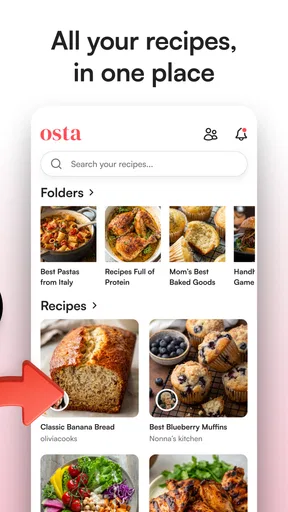
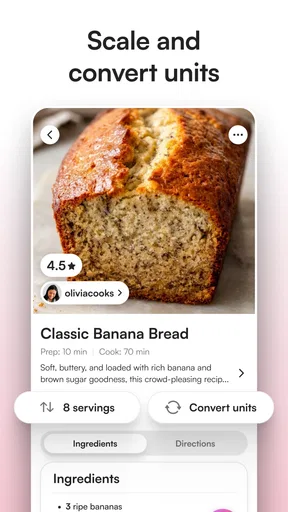
When I’m deciding whether to trust a food app, I separate what it can help me do from what I can actually verify about how it handles my information. Osta is a recipe-saving app from Osta Ltd., and its appeal is easy to understand: recipes tend to end up scattered across browser tabs, notes, screenshots and messages. Keeping them together can make cooking feel less improvised. Still, a tidy collection is only useful if it fits the way I cook, so I’d treat it as a practical organizer rather than assume it replaces meal planning, grocery shopping or a dedicated recipe website.
A recipe library, not a complete kitchen system
The clearest reason to try Osta is to bring recipes into one place instead of relying on memory or searching through old saves. That can help when I want to keep a few dependable weeknight meals alongside dishes I hope to try later. It is especially useful for someone whose recipe collection has outgrown a single notebook but who does not want to turn cooking into a complicated project.
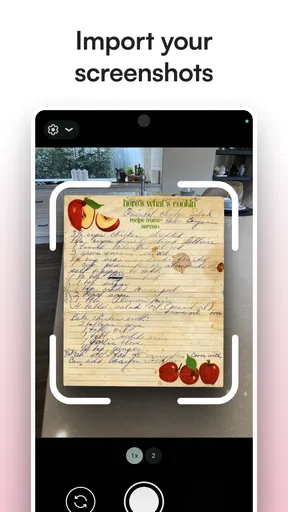
I would judge a recipe-saving tool by how quickly I can get from “that looks good” to finding the recipe again when I need it. A sensible habit is to save recipes at the moment I discover them, then make a small shortlist before shopping or cooking. That gives the collection a purpose: it becomes a working set of ideas rather than a growing pile of things I may never open again.
For a realistic weekday example, imagine I see a promising soup recipe while browsing during a lunch break. I save it, then return to it that evening to check the ingredients before deciding whether it suits what is already in the kitchen. The benefit is not that the app cooks or plans for me; it is that I have a reliable place to look instead of trying to remember which site or conversation contained the recipe.
Trust starts with clear expectations
Osta sits in the food-and-drink category, but saving recipes can still involve personal choices: what I like to cook, what I plan to eat and which dishes I return to. I prefer to be deliberate about those details in any app. I would check the permissions shown on my device and make choices based on what I want the app to access, rather than treating a useful recipe collection as a reason to grant every request automatically.
I also look for account and privacy choices inside an app before building a large personal archive there. Those controls matter because a collection becomes more valuable over time, and I want to know what options I have if my habits change. I would avoid adding information that is not needed for saving recipes, especially personal details about other people, until I have a clear reason to do so.
That cautious approach is not a criticism of Osta; it is a sensible way to use any app that may become part of a daily routine. The app is free to download, while in-app purchases range from $5.99 to $39.99 per item, so I would look carefully at the purchase screen before choosing anything paid. The age rating is Everyone, and its current version is 1.2.5. Those details help set expectations, but they do not replace checking the choices presented on your own device.
Worth Reading Before You Choose

Flipboard Shows What News Apps Must Do Beyond the Feed

Switching to Android Auto Means Rethinking Your Driving Routine

Google Calendar Makes a Crowded Week Easier to Manage

Ludo King Makes the Most of the Minutes Between Plans

Baby Panda World Brings Quick Play to Modern Phones, but Its Game Library Feels Busy

ESPN’s Live Game View Makes Following Close Games Easier
Who will get the most from it
Osta is a better fit for people who collect recipes from different places and want a dedicated home for them than for cooks who already have a simple system they enjoy. A notes app can be more flexible if I want to store recipes alongside unrelated reminders, while bookmarks may be quicker if I only need to revisit a few webpages. A recipe-focused app makes more sense when the main problem is keeping food ideas organized, not managing every part of household planning.
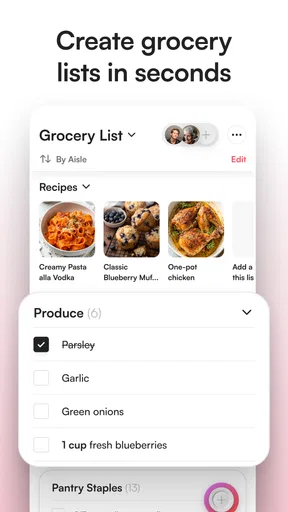
It may be less suitable if I expect automatic meal plans, nutrition analysis, a complete pantry inventory or a built-in shopping workflow. I would not choose an app based on features I have not confirmed. Before moving a large collection, I would try saving a handful of recipes and see whether the process feels natural, whether I can find them again, and whether the available organization matches how I actually search: by dish, occasion, ingredient or simply by what I feel like eating.
Popularity and a careful first try
Osta has a 4.8 average from around 4,400 ratings, with more than 50,000 installs. That suggests plenty of people have taken an interest, though popularity cannot tell me whether its approach suits my kitchen. It was released on June 10, 2025, and the version identified as current is 1.2.5. I would use those details as context, not as a substitute for trying the app with my own recipes and checking whether it remains convenient after the novelty wears off.
My cautious recommendation is to start small. Save a few recipes I genuinely expect to cook, then use the collection during an ordinary week rather than importing everything at once. That makes it easier to notice friction early, including whether the app’s organization feels intuitive and whether any purchase prompts fit what I need. If keeping recipes together is the problem I want to solve, Osta is worth exploring; if I need a broader cooking or household system, I would compare it with tools built for those specific jobs.
Ever wanted to find a way to organize your shopping lists with ease and style? Well, let me introduce you to Osta, an app that’s got your back when it comes to making grocery shopping a breeze. I’ve spent some time fiddling with it, and let me tell you, it’s quite the game-changer.
Getting Started with Osta
The first thing you’ll notice when you open Osta is its clean and intuitive interface. Seriously, it feels like the app is giving you a warm hug and saying, "Let’s get through this together." Setting up your account is straightforward, and you’re prompted to create your first shopping list right off the bat. The app asks for your usual shopping spots and even lets you categorize your items. How neat is that?
Features That Stand Out
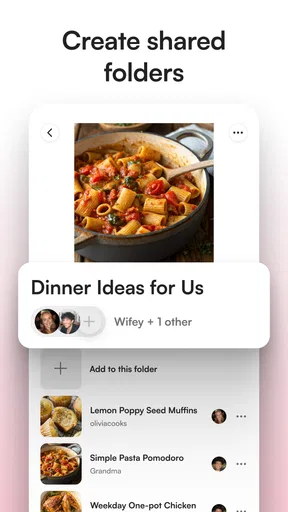
One of the coolest features I found is the ability to share lists with others. Imagine you’re planning a party and need everyone to chip in. Just share your list and watch as everything magically comes together. There’s also a nifty function where you can scan barcodes to add items. No more typing out "that brand of pasta I like.“ Just scan and go!
Another thing worth mentioning is the app’s ability to suggest items based on your previous shopping habits. It’s like having a mini personal assistant, reminding you not to forget the milk or your favorite snacks. And if you’re someone who loves checking things off a list, the satisfying "ping" sound when you mark an item as purchased is like music to the ears.
Why Osta is a Must-Have
Aside from its practical features, Osta offers a sleek design that makes shopping less of a chore and more of a delight. The app updates in real-time, so if someone adds an item to the shared list, you’ll see it instantly. Plus, there’s an offline mode, so even if you’re in a store with spotty Wi-Fi, your list is still accessible.
For the environmentally conscious, Osta also gives tips on sustainable shopping. It’s like having a green thumb for your shopping habits, which I found to be a thoughtful touch.
Ending Thoughts
All in all, Osta is a fantastic tool for anyone looking to streamline your shopping experience. Whether you’re a solo shopper or doing the weekly family haul, this app has features that cater to everyone. The user-friendly interface, combined with its smart list-sharing capabilities, makes it a top contender in the shopping app world.
If you’re still writing your lists on paper and losing them in the depths of your bag, it might be time to give Osta a try. Who knows, it might just become your new favorite shopping companion.
Pros
- User-friendly interface with intuitive navigation.
- Wide range of categories for diverse shopping needs.
- Secure payment options for customer safety.
- Real-time order tracking for convenience.
- Responsive customer support available 24/7.
Cons
- Limited availability in certain regions.
- Occasional delays in delivery times.
- Some items lack detailed product descriptions.
- In-app ads can be intrusive at times.
- Requires stable internet for optimal use.
FAQs for Osta
What is Osta and what features does it offer?
Osta is a versatile shopping app that simplifies online purchasing by aggregating multiple stores into a single platform. It features real-time price comparisons, user reviews, and personalized recommendations. Additionally, Osta offers secure payment options and a seamless, user-friendly interface, making it ideal for both casual and dedicated online shoppers.
Is Osta available for both Android and iOS devices?
Yes, Osta is available for download on both Android and iOS devices. You can find it on the Google Play Store for Android users and the Apple App Store for iOS users. Ensure your device is updated to the latest operating system version for the best performance.
Does Osta ensure secure transactions and protect user data?
Osta prioritizes user security and data protection by implementing robust encryption protocols for all transactions. The app adheres to stringent privacy policies, ensuring that personal information and payment details are kept confidential and secure from unauthorized access.
Are there any costs associated with using Osta?
Downloading Osta is free, but certain premium features may require in-app purchases or subscriptions. These premium options might include advanced filter settings, ad-free browsing, or exclusive discounts. Users can enjoy the core functionalities of Osta without any charge.
How can users resolve issues or provide feedback about Osta?
Users can easily reach out to Osta’s customer support team through the app’s help section. Support is available via email or live chat, offering prompt assistance for any technical issues or inquiries. Additionally, users can submit feedback directly within the app to help improve future updates.


